
From the exam room to the clearinghouse, in one tap.
Record the visit on your iPhone. ICONIC Scribe writes the note, codes the charges and sends the claim — free for 30 days.
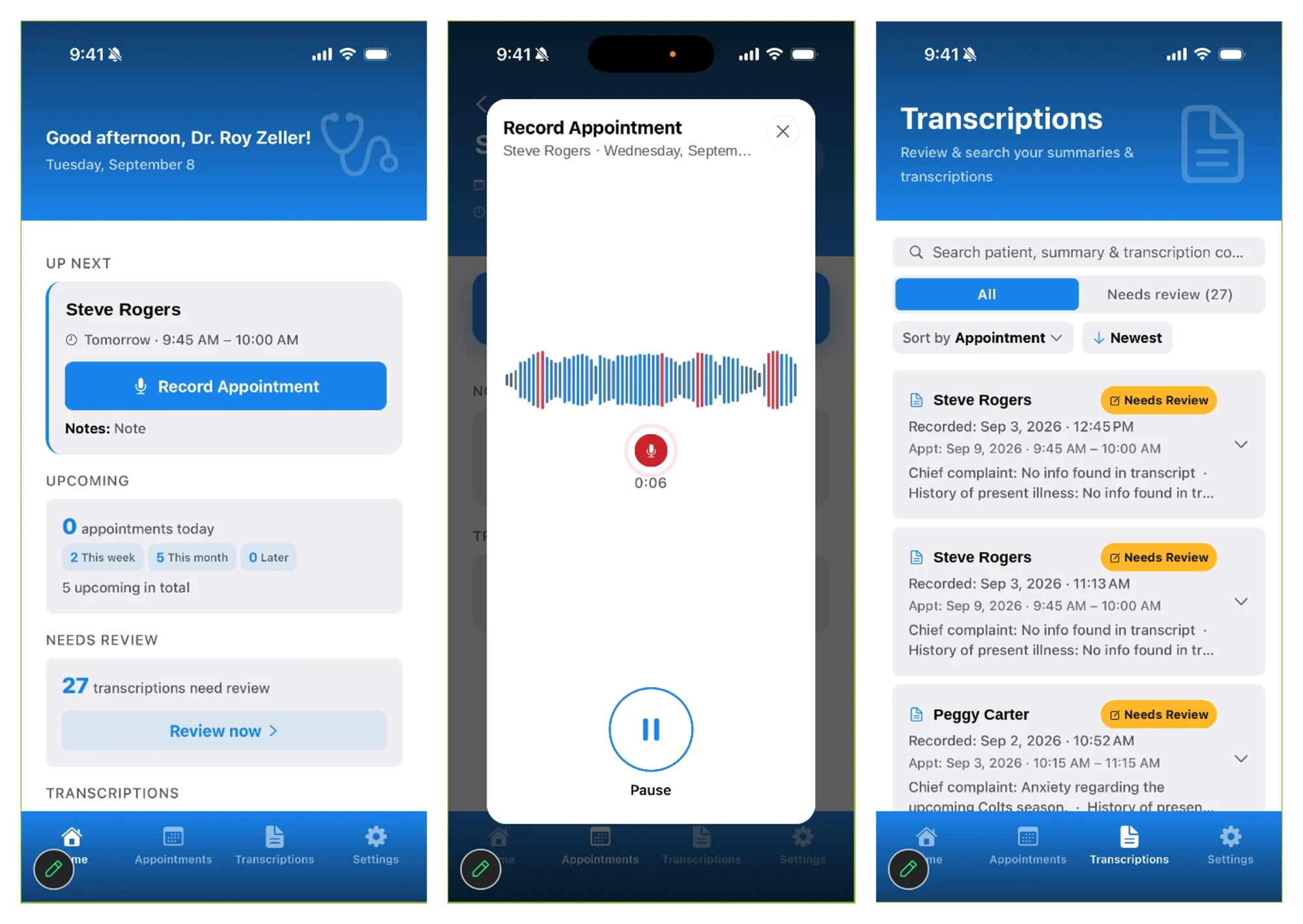
Meet ICONIC Scribe — the iPhone app that records your patient meetings and transcribes them automatically. The AI summary doesn’t stop at chart notes: it converts the transcription into actual charges for your review. Approve them with a click and the claim is created and sitting in the clearinghouse immediately, ready to release to the payer.
- Transcription becomes reviewable charges
- One click creates the claim
- In the clearinghouse immediately
- HIPAA-compliant, built for U.S. practices
- Try it free for 30 days
Start your 30-day free trial
Includes ICONIC portal access. A TKSoftware specialist will contact you to set up your account, usually the same business day.
Other scribes stop at the note.
A standalone AI scribe is one more app: it starts every visit from zero, hands you a note, and leaves the charges and the claim for someone else to key in. ICONIC Scribe lives inside your patient schedule and carries the visit all the way to the clearinghouse.
One patient, one record, four stops
Nothing is entered twice. The appointment booked in Scheduling opens as the encounter in Scribe. The codes Scribe produces arrive in Billing as a claim already built. The Clearinghouse sends it and brings the answer back — so the remittance posts itself and the balance is settled before the next visit is on the calendar.
From spoken words to a claim, in one click
Scribe does not stop at the note. The transcription is summarized into a structured encounter, the encounter is turned into coded charges, and those charges are put in front of the billing specialist to review. Approve them and the claim is built and sitting in the ICONIC Clearinghouse before the next patient is roomed — waiting only on the next scheduled delivery to the payer.
Patient privacy is engineered in, not bolted on.
ICONIC Scribe is built on the same security foundation that protects claims and PHI across the ICONIC Pro platform.
- All recordings, transcripts, and summaries stored in TKSoftware’s HIPAA-compliant data center
- Encryption for data in transit and at rest
- Role-based access controls and audit logging
- Business Associate Agreement (BAA) available for every practice
100%
of PHI stored in our HIPAA-compliant data center
0
recordings left unencrypted on the device
iOS
native iPhone app, designed for the exam room
Frequently asked questions
What is ICONIC Scribe?
ICONIC Scribe is an iOS app from TKSoftware, available now on the Apple App Store, that lets healthcare practices record patient meetings on an iPhone, automatically transcribe the conversation, and generate an AI summary of the visit. The summary is then converted into the actual charges for the visit for the billing specialist to review; approving them with a single click creates the claim and places it in the clearinghouse immediately, ready to release to the payer. It connects to ICONIC Scheduling so each recording is tied to the correct patient and appointment, and all data is stored in TKSoftware’s HIPAA-compliant data center.
Is ICONIC Scribe HIPAA-compliant?
Yes. ICONIC Scribe is designed for HIPAA compliance. All audio, transcripts, and AI summaries are encrypted in transit and at rest and stored in TKSoftware’s HIPAA-compliant data center rather than on the device. The platform uses role-based access controls and audit logging, and a Business Associate Agreement (BAA) is available for practices.
How does it connect to our scheduling system?
ICONIC Scribe integrates with ICONIC Scheduling, TKSoftware’s patient scheduling system. Your day’s appointments appear in the app, so when you record a visit it is automatically linked to the right patient and appointment — no manual matching required.
How does the AI transcription and summary work?
When you record a patient meeting, the audio is securely transcribed into text. An AI model then generates a concise summary highlighting key discussion points and follow-up items. The summary is meant to support clinical documentation — the provider reviews and approves the final record before it’s saved.
How does a recorded visit become a claim?
The AI summary does not stop at chart notes. It converts the transcription into the actual charges for the visit and presents them as a list — codes and units — for the billing specialist to review.
Nothing is filed automatically. The billing specialist checks the charges, edits anything that needs changing, and approves. That single click creates the claim and places it in the clearinghouse immediately, ready to release to the payer.
Because ICONIC Scribe, ICONIC Scheduling, the billing software and the clearinghouse are all one platform, there is no export, no re-keying, and no hand-off to a separate billing step between the visit and the claim.
When will ICONIC Scribe be available, and what does it cost?
ICONIC Scribe is available now on the Apple App Store for iPhone, and every practice can try it free for 30 days. To start your trial, request it here or call TKSoftware at 317-228-0857.
Do we need to be an ICONIC Pro customer to use it?
ICONIC Scribe runs on the ICONIC Scheduling calendar, which lives in the ICONIC portal — that is how each recording is tied to the right patient and appointment. Your 30-day free trial includes portal access, so you can try the full schedule-to-claim workflow before you commit. Contact our team at 317-228-0857 or info@tksoftwareinc.com to discuss how it fits with your current TKSoftware setup.
Get ICONIC Scribe
Try it free for 30 days and go from the exam room to a filed claim without touching a keyboard. We’ll set up your portal and schedule so your first recorded visit is linked to the right patient.